Every smart home automation reduces to the same sequence: a sensor detects a physical change — body heat moving through a hallway, a window swinging open, an intruder's warm signature crossing a dark room — and reports it to a central hub, which then triggers the routine you have defined. Buy the wrong sensor and the routine never fires, or fires when you don't want it to. The most reliable way to choose is to work backward from your goal — hands-free entryway lighting, perimeter security, intruder detection — to the sensor technology that detects exactly the change you care about, then confirm it will integrate with your hub.
Choosing the Right Sensor for Your Automation Goal
The first question is not "which sensor should I buy?" but "what physical change do I need to detect?" Smart sensors are distinguished from basic ones by an embedded microprocessor that lets them process readings locally and report only meaningful changes of state to the hub, rather than streaming raw data. That reported state change — motion detected, door opened, heat signature present — is the trigger your automation software listens for. Each common sensor type specializes in a different kind of change.
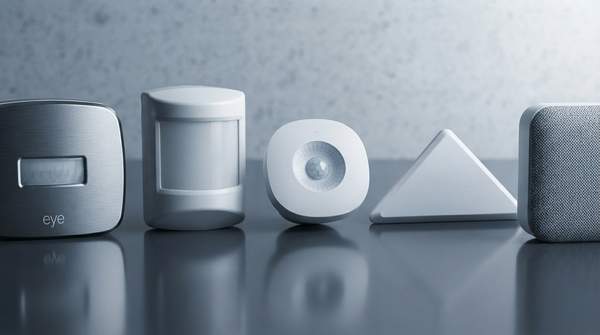
Motion sensing is dominated by two technologies with a clear trade-off. An overview of smart home device types from IBM describes Passive Infrared (PIR) sensors as the most widely used sensors for home security. A PIR sensor detects body heat, or infrared energy, and establishes a protective grid; when a moving object blocks multiple grid zones and the infrared energy levels change, the sensor trips. Because a warm, moving body is precisely what you want to detect when someone walks into a room, PIR is equally well suited to lighting automation and to security monitoring of a defined space.
The alternative, microwave (MW) sensing, works differently: the sensor sends out microwave pulses and measures the reflection off moving objects. According to the same IBM overview, microwave sensors cover more area than infrared sensors, but they are more expensive and vulnerable to electrical interference. For most rooms, that trade-off favors PIR; microwave's wider coverage becomes attractive mainly in large, open spaces where a single PIR unit cannot see everything.
Contact sensors — commonly sold as door and window sensors — solve a different problem: they tell you whether a specific opening has changed state. A TechTarget explainer by Paul Kirvan and Brien Posey lists window and door sensors alongside smart locks and motion sensors as standard security devices, noting that these devices detect when a door or window has been opened or closed. A motion sensor tells you something moved somewhere in its field of view; a contact sensor tells you which entry point was touched and when.
For presence detection in a secured interior, thermal imaging offers a distinct capability: as that TechTarget article describes, thermal imaging sensors detect an intruder's body heat directly, rather than inferring presence from movement across grid zones. Where a PIR sensor needs the target to cross multiple zones, a thermal sensor registers the heat signature itself — a meaningful difference when the goal is identifying an unexpected person in a space where no one should be.
How the Pieces Connect
Individual sensors become a system through a shared network. The TechTarget piece explains that devices such as smart locks, motion sensors, and window and door sensors are commonly connected to a common network, which lets the security sensors work together to create a comprehensive security status picture. In a typical home setup, that means each battery-powered sensor communicates wirelessly to a hub or gateway, and the hub — not the sensor — holds the logic that decides what happens next: turn on the entryway light, send an alert, or log the event.
This division of labor is why hub compatibility matters more than any single sensor's specification. The hub translates each sensor's state change into coordinated action across the home; the same TechTarget article notes that consumers use this arrangement to track and run thermostats, appliance performance, interior and exterior lighting, and security systems. A sensor that cannot talk to your hub is a standalone gadget, not an automation trigger, so the communication link between sensor and hub is the one purchasing constraint you should confirm before anything else.
Smart Home Sensor Decision Framework
The table below maps three common automation goals to the sensor technology that enables each one. The reasoning path for every row is the same: identify the physical change your goal depends on, then pick the sensor built to detect that change, and place it where that change is guaranteed to pass through its detection mechanism.
| Automation Goal | Recommended Sensor Type | How It Works | Best Placement |
|---|---|---|---|
| Entryway lighting — lights turn on when someone enters a room or area | PIR (Passive Infrared) motion sensor | Detects body heat; a moving object that blocks multiple zones of its protective grid trips the sensor | Where it can view the space people walk through on entry, such as a doorway or corner facing into the room |
| Perimeter security — know when a monitored door or window opens or closes | Contact (door/window) sensor | A two-part sensor registers the opening or closing of a specific door or window | On the frame and moving panel of each door or window you want monitored — no line of sight needed |
| Intruder detection — identify a person's presence inside a secured area | Thermal imaging sensor, or a PIR motion sensor | Thermal sensors detect an intruder's body heat directly; PIR sensors detect heat plus movement across zones | Inside the secured space, positioned to cover the path an unexpected person would cross |
Two inferences in this framework deserve candor. The underlying explainers describe contact and motion sensors as devices that enhance home security; they do not spell out an alerting mechanism, so treating a contact sensor's "opened" report as the trigger for a push alert to your phone follows from that security role — confirm your hub supports notification routines before assuming it. Likewise, the value of thermal and motion sensors as an added layer of interior protection is an inference from their documented ability to detect body heat and movement in spaces where no one should be present.
Placement follows directly from each detection mechanism. PIR and thermal sensors rely on line of sight to heat, so their mounting position must command the area of interest. Contact sensors have no field-of-view requirement at all — they simply need to sit close enough to the opening to register its two states, which makes them the most placement-tolerant option in the framework. If you are weighing microwave sensors for a large room instead, remember the documented trade-off: broader coverage, but higher cost and vulnerability to electrical interference.
Your Next Step: Choosing and Integrating Sensors
The decision is to select the sensor type that directly addresses your primary automation goal, ensuring it is compatible with your chosen smart home hub and communication protocol. Diagnose the need first — occupancy for lighting, opening state for perimeter security, heat or movement for intruder detection — then buy only the hardware that detects that specific change, and verify the hub link before mounting anything.
The measurable indicator of success is the successful execution of a desired automation routine (e.g., lights turning on automatically, security alerts received). Test each automation deliberately after installation: walk into the monitored entryway and watch the light respond, then open a monitored window and confirm the hub registers the change. A sensor that reliably produces its intended routine in those trials has done its job; one that does not is misplaced, mispaired with the hub, or the wrong technology for the change you actually needed to detect.