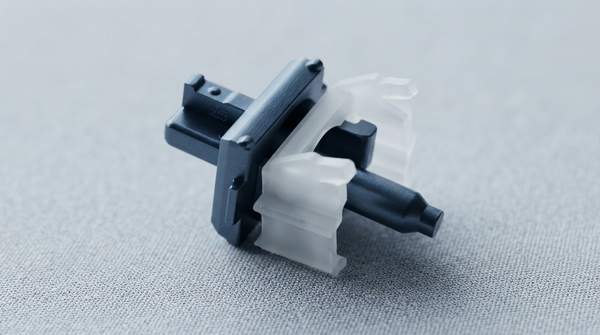
The difference between a smooth, silent keystroke and a loud, typewriter-style clack comes down to one small plastic part: the switch stem. Linear, tactile, and clicky switches all share the same basic architecture, but the shape of the stem's legs—and, in clicky switches, an added clicking mechanism—determines whether you feel nothing, a bump, or a bump plus a sharp sound on every press. Understanding that cause-and-effect is the key to choosing the right switch for gaming, office work, or enthusiast typing.
The Core Mechanics of Mechanical Keyboard Switches
Every mechanical switch is a self-contained unit: a stem rides on a metal spring inside a two-piece housing, and pressing the keycap pushes the stem down until the switch registers a keystroke. What separates switch types is not the housing or the electronics but the geometry of the stem itself. A guide from the Scholars' Lab at the University of Virginia describes the stem legs as the decisive feature: linear stems have smooth legs, tactile switches show a visibly noticeable bump on the legs, and clicky switches use a more complicated stem to deliver both tactile and audio feedback.
It also helps to separate feel from sound. As RK Royal Kludge's switch guide puts it, what you feel under your fingers is "controlled primarily by the switch stem design, spring weight, and physical actuation style," while what you hear is shaped by housing materials, keycaps, mounting structure, and case foam. This article focuses on the switch itself—the noise the mechanism generates—rather than the full acoustic profile of a finished keyboard, which keycaps and case design also change.